
koala73 / worldmonitor
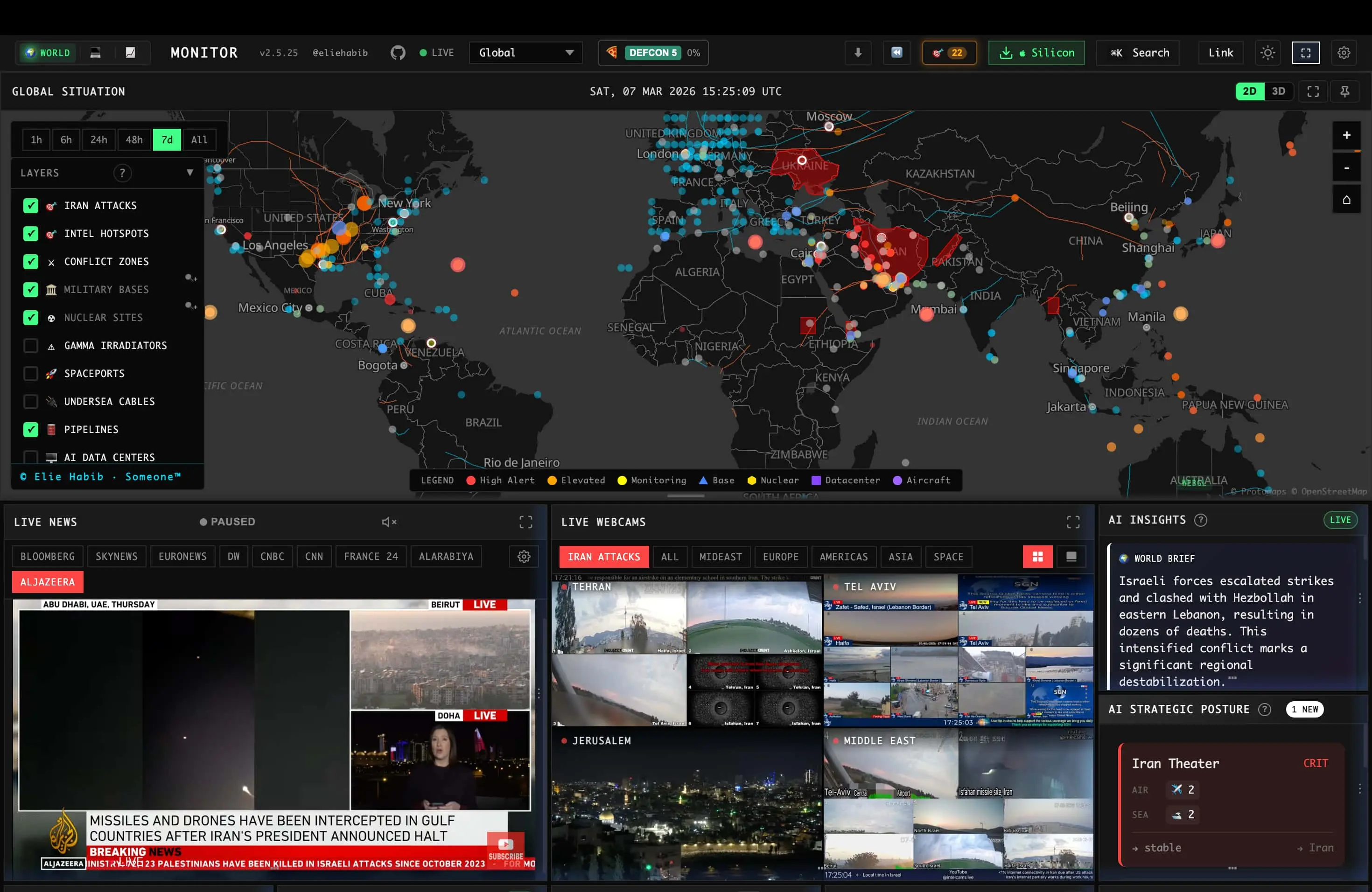
A real-time global intelligence dashboard that brings together AI-assisted news aggregation, geopolitical monitoring, and infrastructure tracking in one interface.
description README.md
World Monitor
Real-time global intelligence dashboard — AI-powered news aggregation, geopolitical monitoring, and infrastructure tracking in a unified situational awareness interface.

















-0078D4?style=for-the-badge&logo=windows&logoColor=white)


-FCC624?style=for-the-badge&logo=linux&logoColor=black)
Documentation · Releases · Contributing

What It Does
- Curated news feeds across global and regional categories, AI-synthesized into briefs
- Dual map engine — 3D globe (globe.gl) and WebGL flat map (deck.gl) with a shared map-layer catalog
- Panel inventory — concrete panel implementations across specialized variants
- Cross-stream correlation — military, economic, disaster, and escalation signal convergence
- Country Instability Index (CII) — live CII v8 scores, bands, and approximate 24-hour movement for 31 Tier-1 countries
- Finance radar — stock exchanges, commodities, crypto, and a market composite
- Local AI — run everything with Ollama, no API keys required
- Site variants from a single codebase (world, tech, finance, commodity, happy, energy)
- Native desktop app (Tauri 2) for macOS, Windows, and Linux
- Multilingual UI with native-language feeds and RTL support
For the full feature list, architecture, data sources, and algorithms, see the documentation.
Support Status
All site variants and desktop binaries are built from a single codebase and ship from the same release process. The table below clarifies maintenance status so you know which surfaces are safe to depend on.
| Surface | Status | Notes |
|---|---|---|
worldmonitor.app, tech., finance., commodity., happy., energy. | Stable | Public deployments built from this repo, actively maintained |
| Desktop binaries (Windows / macOS Apple Silicon / macOS Intel / Linux AppImage) | Stable | One Tauri binary for every variant — install World Monitor and switch to tech, finance, commodity, energy, or happy in-app. There is deliberately no per-variant download |
Issues filed against any of the above are triaged from the same backlog — see the issues board for currently-open work.
Quick Start
git clone https://github.com/koala73/worldmonitor.git
cd worldmonitor
npm install
npm run dev
Open localhost:3000 (override the port with DEV_PORT in .env.local). The app runs with no environment variables.
Feature-specific data sources may require credentials. See .env.example for the full list.
For variant-specific development:
npm run dev:tech       # tech.worldmonitor.app
npm run dev:finance    # finance.worldmonitor.app
npm run dev:commodity  # commodity.worldmonitor.app
npm run dev:happy      # happy.worldmonitor.app
npm run dev:energy     # energy.worldmonitor.app
See the self-hosting guide for deployment options (Vercel, Docker, static).
Tech Stack
| Category | Technologies |
|---|---|
| Frontend | Vanilla TypeScript, Vite, globe.gl + Three.js, deck.gl + MapLibre GL |
| Desktop | Tauri 2 (Rust) with Node.js sid |