
stablyai / orca
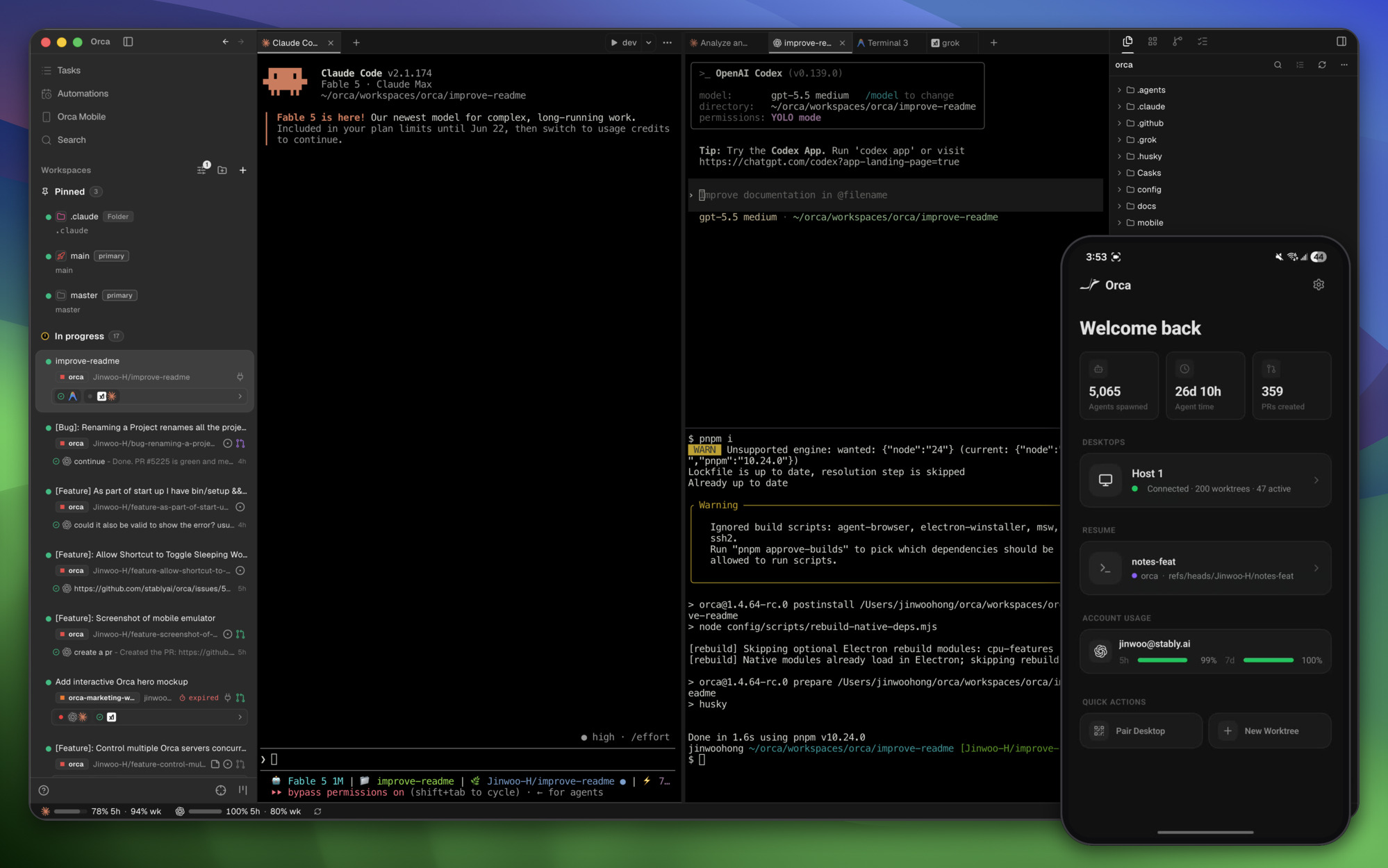
Orca is the ADE for working with a fleet of parallel agents. Run any coding agent with your own subscription. Available on desktop and mobile.
play_circle Watch in action
description README.md
 Orca
Orca



中文 · 日本語 · 한국어 · Español · Français · Português
The AI Orchestrator for 100x builders.
Run Codex, ClaudeCode, OpenCode or Pi side-by-side — each in its own worktree, tracked in one place.
Download Orca

Features
Mobile CompanionMonitor and steer your agents from your phone — get notified when an agent finishes and send follow-ups from anywhere. |
 |
Parallel WorktreesFan one prompt across five agents, each in its own isolated git worktree — compare the results and merge the winner. |
 |
Terminal SplitsGhostty-class terminals with WebGL rendering, infinite splits, and scrollback that survives restarts. |
 |
Design ModeClick any UI element in a real Chromium window to send its HTML, CSS, and a cropped screenshot straight into your agent's prompt. |
 |
GitHub & Linear, NativeBrowse PRs, issues, and project boards in-app — open a worktree from any task and review without a context switch. |
 |
SSH WorktreesRun agents on a beefy remote box with full file editing, git, and terminals — auto-reconnect and port forwarding included. |
 |
Annotate AI DiffsDrop comments on any diff line and ship them back to the agent — review, edit, and commit without leaving Orca. |
 |
Drag Files to AgentsVS Code's editor with autosave everywhere — drag files or images straight into an agent prompt. |
 |
Orca CLIAgents drive Orca too — script every workflow with |
 |
Also in the box:
- Quick open — Search across worktrees, files, agents, commands, and repo context without leaving your flow.
- Account switcher & usage tracking — See Claude and Codex usage and rate-limit resets, and hot-swap accounts without re-logging in.
- Rich repo previews — Preview Markdown, images, PDFs, and repo docs in the workspace.
- Computer Use — Let agents operate desktop apps and visible UI when a workflow needs real interaction.
- Notifications and unread state — Know when an agent finishes or needs attention, then mark threads unread to come back later.
- And many, many more — we ship daily, so this list is perpetually behind. The changelog is the real feature list.
Supported Agents
Works with any CLI agent — if it runs in a terminal, it runs in Orca.
More in Uncategorized

openclaw / openclaw
OpenClaw is an open-source personal AI assistant that runs on your own devices and connects to the communication platforms you already use. It provides a fast, always-available assistant that can respond, listen, speak, and perform tasks across desktop and mobile devices.

obra / superpowers
An agentic skills framework & software development methodology that works.

mattpocock / skills
Created by renowned TypeScript educator Matt Pocock, Skills is a collection of practical, reusable workflows for AI coding agents such as Claude Code and Codex. The skills help developers plan, test, debug, and build real-world software while keeping control of the engineering process

affaan-m / everything-claude-code
The agent harness performance optimization system. Skills, instincts, memory, security, and research-first development for Claude Code, Codex, Opencode, Cursor and beyond.